

07/03/2026
Last modified
07/03/2026
Setting up an Aedes Websocket MQTT broker on Plesk (Phusion Passenger)
2 minutes read
Using Websocket and MQTT through Plesk requires a bit of tinkering. Here are the main points to keep in mind.
nginx Setup
In Apache & nginx Settings, uncheck Proxy mode:
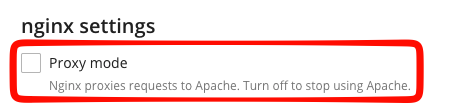
Then, add the following Additional nginx directives:
add_header X-Robots-Tag "noindex, nofollow" always;
proxy_http_version 1.1;
proxy_set_header Upgrade $http_upgrade;
proxy_set_header Connection "upgrade";
proxy_set_header Host $host;
Phusion Passenger entry point setup
If you use ES module Javascipt in you app.js file, then Phusion Passengeger will look for a .bootstrap.cjs file and throw an error :
Error: Cannot find module '/your/projet/path/.bootstrap.cjs'
To resolve this issue, create a file that use CommunJS syntax and import your module:
(async () => {
  await import('./app.mjs'); // Point to your actual ESM entry file
})();
Basic application example
Here is a minimal app.mjs example that enables MQTT over websocket and that is compatible with Phusion Passenger and can be run using Plesk built-in support for node.js application
import express from 'express';
import {Aedes} from 'aedes'
import http from 'node:http';
import {WebSocketServer, createWebSocketStream} from 'ws'
import dotenv from 'dotenv';

dotenv.config({quiet: true});

const app = express();
const server = http.Server(app);
const aedes = await Aedes.createBroker({persistence: 0})

/**
 * Enable if you're behind a reverse proxy (Heroku, Bluemix, AWS ELB, Nginx, etc)
 * see https://expressjs.com/en/guide/behind-proxies.html
 */
app.set('trust proxy', ((parseInt(process.env.BEHIND_PROXY) === 1)));

// Index page
app.get(["/"], (req, res) => {
  res.send("200");
});

// Create Websocket server
const wss = new WebSocketServer({
  server: server
})

// Bind the websocket server with Aedes
wss.on('connection', (websocket, req) => {
  const stream = createWebSocketStream(websocket)
  aedes.handle(stream, req)
})

// Launch app.
const PORT = process.env.PORT || 8080;
server.listen(PORT, () => {
  console.log(`App listening on port ${PORT}`);
  console.log('Press Ctrl+C to quit.');
});