

Phishing in the age of AI: fake calls for tenders portal
An email seemingly from a "potential client" invites the recipient to view potential offers documents behind a code-protected "portal." After entering the code, an fake Microsoft product interface presents a second code and opens a Microsoft authentication window. This is a targeted phishing scenario that exploits the hijacking of Microsoft authentication to steal access tokens and reuse your identity as bait for the next attack.
Real-life case timeline
1. Email inbox
The message announces a project, a deadline, and a link to a document "portal," along with a four-digit access code. The signature contains all the usual contact information of a real client. At first glance, it seems credible. But the link isn't clickable, and the use of emojis is odd.
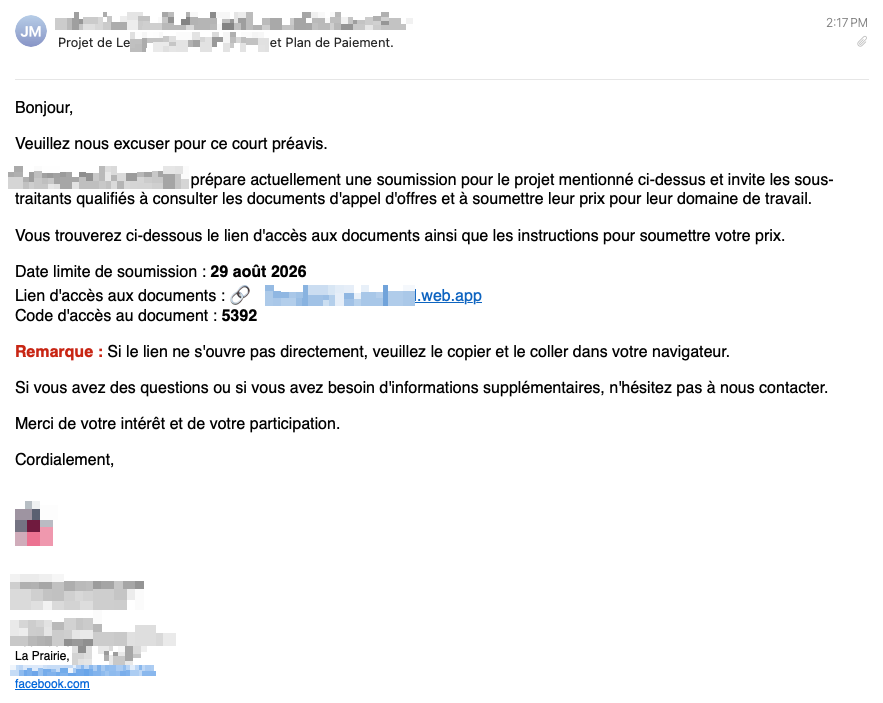
We sometimes receive PDFs via password-protected portals. We want to quickly skim the documents to decide whether to delete the email or if we should give it our attention.
2. Quick verification of the company's authenticity
I confirm that the company does indeed exist. Nothing unusual at this stage. The website exists, the person exists, etc.
3. Access to the portal and first code
I navigate to the link and enter the provided code. The URL belongs to a subdomain of a Firebase application, and uses the client's name as the subdomain.
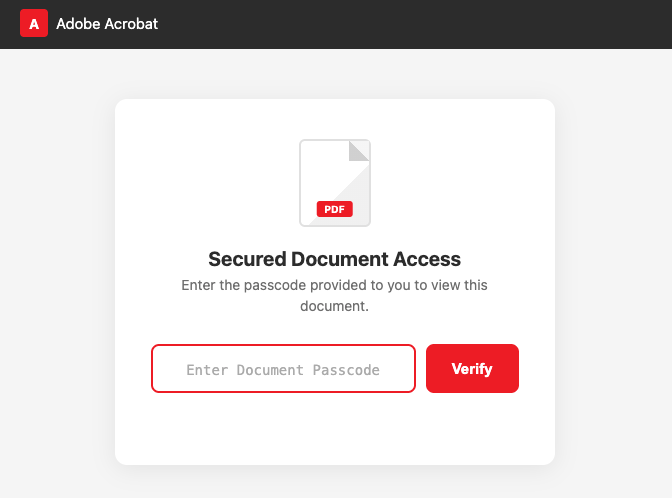
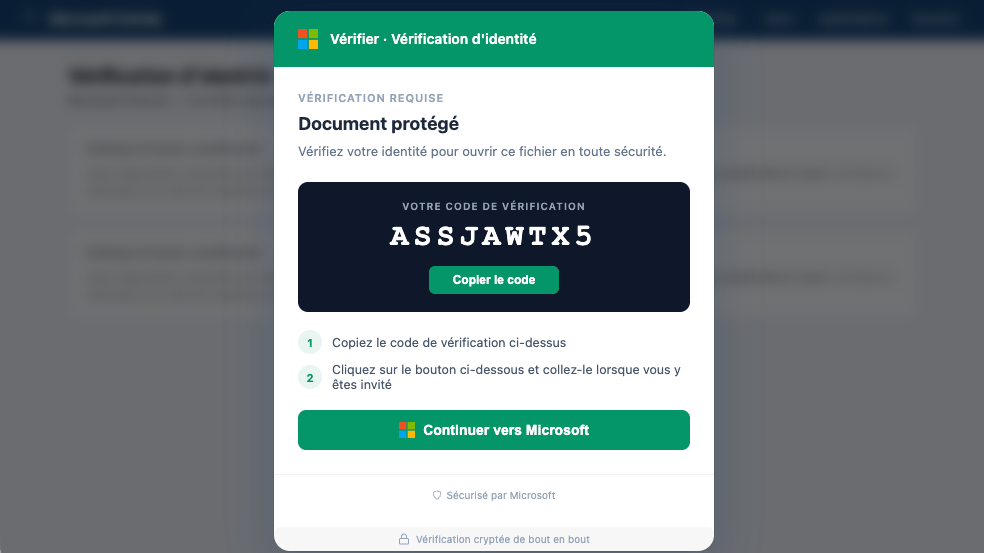
4. Redirection to an interface that looks very much like a Microsoft product
The "portal" then displays a second code and a button that opens a Microsoft authentication window. The interface closely resembles a legitimate Microsoft product.
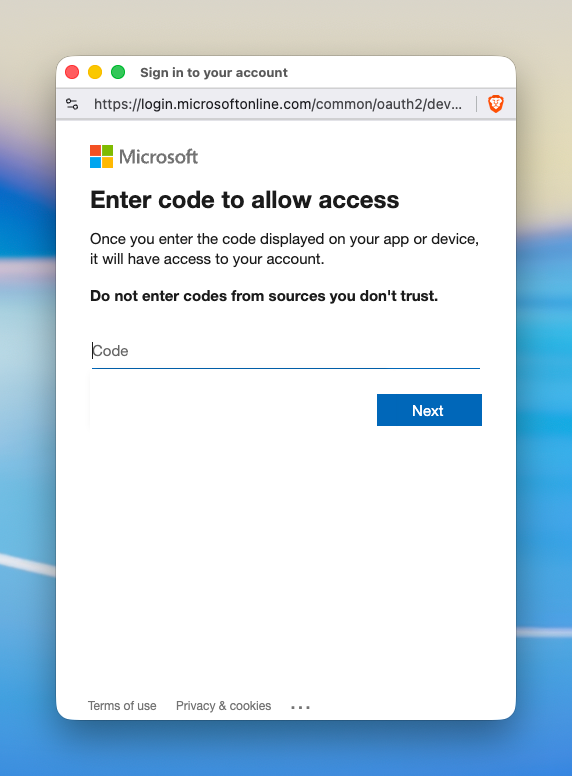
I stop just as I'm about to enter the code when I read: "Do not enter codes from sources you don't trust." I realize there's no clear information about what I'm actually authorizing.
5. Doubt and a step back
I put the process on hold and wrote to the potential client: “Hi, I don’t trust your authentication system to obtain the PDF. Please send it to us another way.”
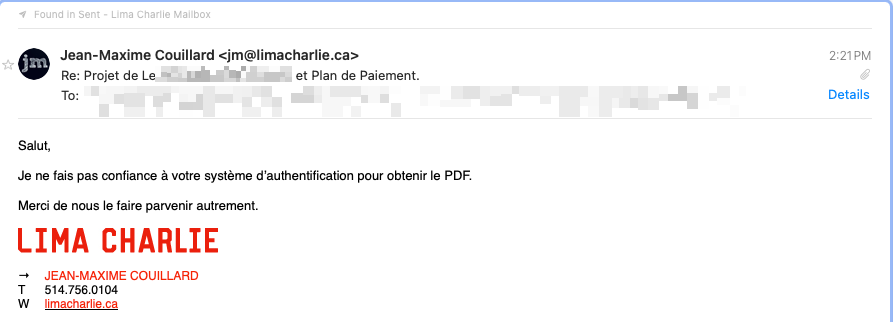
6. Credible response from the potential client
A few minutes later, I received a reply mentioning the project name (a city in Quebec). I still had my doubts. It was plausible… but I remained cautious. The email signature was gone.
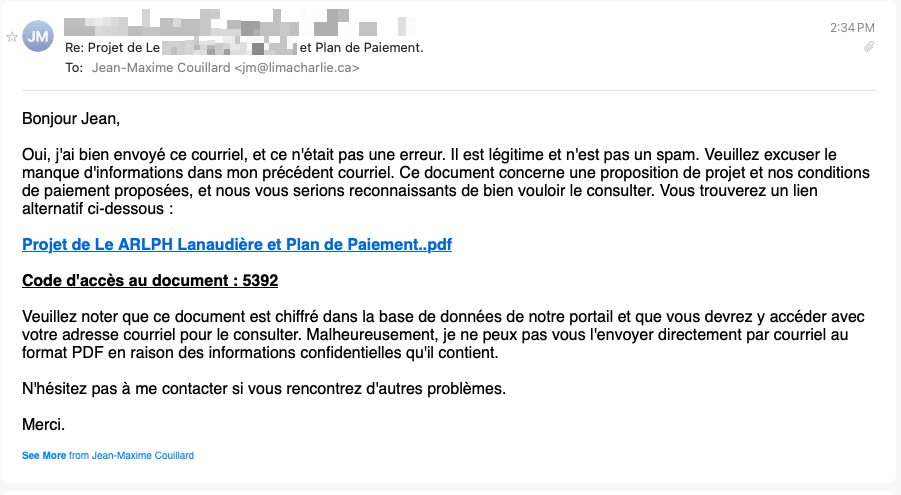
7. Phone verification and SCAM confirmation
I call the potential client using the number in their signature. As soon as he answer, the person says: "You just received an email, right?" and confirms it's a scam. Their identity has likely been stolen and is being used as bait to lure potential employees.
What's happening behind the scenes
The first interface uses Firebase hosting services, a Google service. The code is likely generated by AI: the secret code is written in plain text within the source code!
The second interface uses a redirection to a hidden URL (blob:https://lesjardinsvd-contracting.web.app/d8ce183f-cf31-482c-8a87-d158b5cbf537) which contains an iframe linking to a very suspicious domain. Because it's a full-screen iframe, the URL isn't visible in the browser's address bar.
This is when the trap occurs. The malicious website initiates a Microsoft authentication flow (Device Code). Specifically:
- The portal displays a "one-time" code and redirects you to a legitimate Microsoft page.
- If you enter this code and authenticate, you link your session to the attacker's application.
- In this case, the attacker obtains an access token for your Microsoft 365 account, sometimes even despite 2FA, because the authentication itself was performed by you on a legitimate Microsoft domain.
Once the attacker has the token, they:
- Access your email/OneDrive/SharePoint account according to the permissions granted.
- Continue the phishing campaign by contacting your contacts (real contacts, or even those gathered from the web in a related geographic region, as was the case for me).
- By using your identity, they also exploit your reputation to multiply the number of victims.
Who's to blame?
The first person to blame is, of course, me. I could have been scammed by trying to quickly learn the details of the request for proposals to see if it was worth my attention.
We could also blame the "potential client" who didn't implement sufficient security measures to protect their email account.
But I believe the most significant flaw lies with Microsoft: it's not a security vulnerability, but rather a user interface flaw. I had no idea of the importance of the code I was asked to enter; the permissions involved weren't properly listed. It could have been mistaken for a completely ordinary Microsoft authentication window, but I was actually being asked to grant full access to my account.
Fortunately, I became suspicious at the right time. Now it's your turn to do the same.
All articles in the series
Back to the series
Phishing in the age of AI: fake calls for tenders portal
